No products in the cart.

How to replace iPhone 4 Battery and iPhone 4S Battery Leave a comment
In this guide we are going to learn how to replace an iPhone 4 battery and iPhone 4S battery. All batteries from aussiebattery are assembled with the best quality chipsets from Texas instruments. All batteries are quality control tested before leaving the warehouse. Most batteries include a toolkit that has a pentalobe and Phillips screwdriver as well as other necessary parts to replace your battery.
How long should an iPhone 4 battery last?
With regular use an iPhone 4 battery could last for days but due to technology changing this is no longer the case. Power hungry apps, bluetooth, fitness trackers and CPU hogging games are all factors that contribute to a faster declining battery. Apple states that the iPhone 4 provides up to 14 hours of talk time and 40 hours of audio playback. 10 hours of wifi use and 6 hours of 3G internet use is also reported by apple. A whopping 300 hours of standby time and power saving modes to help extend the battery life even further.
However real world tests from real users provide a more accurate view of battery life. Many review sites started to come out with mostly positive reviews but could not match the numbers stated by Apple. Not to worry though as the iPhone 4 was generally received as the best and longest lasting phone on the market.
Over the months and years battery degradation on iPhone 4 and iPhone 4S battery becomes significantly worse than fresh. It is inevitable and as with any lithium battery it will eventually need to be replaced. Changing technology and as mentioned above, power hungry apps and other factors contribute to the degradation. The solution is to replace the battery yourself using our easy to follow guide.
How to replace an iPhone 4 battery and iPhone 4S battery
Discharge your iPhone 4 battery below 10%. A fully charged iPhone 4 battery can combust or explode if punctured.
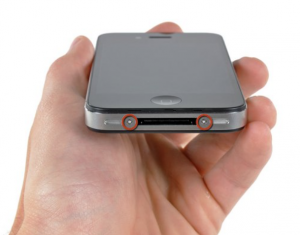
Step 1: Turn off your iPhone. Remove the two #000 Phillips head screws or pentalobe screws
.
Step 2: Locate the two 3.6mm Pentalobe or #000 screws near the dock connection. Remove these two screws.
Step 3: Use a suction cap or your fingers to slide the rear panel toward the top of your iPhone 4. Once it has moved 2-3mm lift the rear panel away being careful not to damage the small clips.
Step 4: Use the 2.5mm Phillips screwdriver to remove the single screw connecting the battery to the logic board. Gently pry up the battery connector using one of the plastic tools. Pay extra care when removing the battery connector from the logic board.
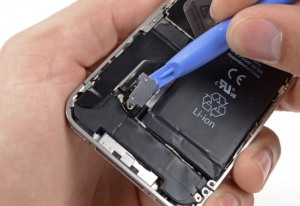
Step 5: Locate the clip covering the antenna connector and remove.
Step 6: Gently pull on the plastic tab to remove the battery. If the tab is broken you can use a spudger tool to try and pry it free. If the adhesive is too strong then a tiny bit of high proof alcohol should help. Apply the alcohol using a cotton swab on the edges of the battery and wait a few minutes.